What is SRv6
SRv6 is an extension of IPv6 that implements Source Routing. Source Routing means that the data sender specifies not only the destination but also the route. Nodes to pass through are identified by SIDs (Segment Identifiers), and the route can be freely controlled by including the list in the packet header. In SRv6, an IPv6 address corresponds to a SID.
The specification of SRv6 is being developed mainly by IETF (Internet Engineering Task Force) 1. It was published as RFC8754 2 in March 2020.
Let’s take a closer look at the SRH (Segment Routing Header) of the IPv6 header used in SRv6. First, the Routing Type is magic number 4 for Segment Routing. In entries Segment List[0] ~ Segment list[n], list the segments to pass through in descending order from the last segment. Store the number to the next segment in Segments Left and the number of the last Segment in Last Entry. If there is additional information such as HMAC, which is a security mechanism, add it as TLV (Type Length Value).
Routing headers are defined in [RFC8200]. The Segment Routing Header (SRH) has a new Routing Type (4).
The SRH is defined as follows:
 0                   1                   2                   3
 0 1 2 3 4 5 6 7 8 9 0 1 2 3 4 5 6 7 8 9 0 1 2 3 4 5 6 7 8 9 0 1
+-+-+-+-+-+-+-+-+-+-+-+-+-+-+-+-+-+-+-+-+-+-+-+-+-+-+-+-+-+-+-+-+
| Next Header   |  Hdr Ext Len  | Routing Type  | Segments Left |
+-+-+-+-+-+-+-+-+-+-+-+-+-+-+-+-+-+-+-+-+-+-+-+-+-+-+-+-+-+-+-+-+
|  Last Entry   |     Flags     |              Tag              |
+-+-+-+-+-+-+-+-+-+-+-+-+-+-+-+-+-+-+-+-+-+-+-+-+-+-+-+-+-+-+-+-+
|                                                               |
|            Segment List[0] (128-bit IPv6 address)             |
|                                                               |
|                                                               |
+-+-+-+-+-+-+-+-+-+-+-+-+-+-+-+-+-+-+-+-+-+-+-+-+-+-+-+-+-+-+-+-+
|                                                               |
|                                                               |
                              ...
|                                                               |
|                                                               |
+-+-+-+-+-+-+-+-+-+-+-+-+-+-+-+-+-+-+-+-+-+-+-+-+-+-+-+-+-+-+-+-+
|                                                               |
|            Segment List[n] (128-bit IPv6 address)             |
|                                                               |
|                                                               |
+-+-+-+-+-+-+-+-+-+-+-+-+-+-+-+-+-+-+-+-+-+-+-+-+-+-+-+-+-+-+-+-+
//                                                             //
//         Optional Type Length Value objects (variable)       //
//                                                             //
+-+-+-+-+-+-+-+-+-+-+-+-+-+-+-+-+-+-+-+-+-+-+-+-+-+-+-+-+-+-+-+-+
Quoted from RFC8754
Hereafter, we will distinguish between the node that starts Segment Routing as the Ingress node, the node corresponding to the Segment as the Segment endpoint, and the node that terminates Segment Routing as the Egress node. There are two ways to implement SRv6 depending on where the SRH is placed.
The first is Encap. The original packet is left as is and encapsulated with an IPv6 header including SRH (distinguished as Inner and Outer hereafter). At the ingress node, the destination of the Outer IPv6 header is embedded in the first segment and sent out. At the Segment Endpoint, the destination of the Outer IPv6 header is updated sequentially and forwarded to the next Segment. At the Egress node, the Inner packet is extracted and forwarded to the original destination.
The second is Inline (or Direct). Simply insert the SRH header immediately after the original IPv6 header.
SRv6 Implementation in Linux Kernel
Details about the SRv6 implementation in the Linux Kernel were published at ARNW ‘17 3. It is an implementation that can be used on both end hosts and routers. Merged in Linux Kernel 4.10. It was the first Open Source implementation at the time. Later implemented in fd.io vpp as well.
When a packet is received, the network driver allocates an skb. After that, it goes through several stages related to routing. In IPv6, each stage corresponds to ip6_rcv() for PREROUTING, ip6_forward() for FORWARD, ip6_output() for POSTROUTING, ip6_input() for INPUT, and ip6_xmit() and ip6_local_out() for OUTPUT stages.
When the seg6_enabled sysctl is enabled, ipv6_srh_rcv() is called at the INPUT stage and SRv6-specific processing is performed. For example, if Segment Left is 0, it is the Egress node, so extract the inner packet. If it is not 0, it is the Segment Endpoint, so decrement Segment Left and update the destination, then forward to the next segment.
Source: Implementing IPv6 Segment Routing in the Linux Kernel
Let’s also take a closer look at the SRH addition/deletion part.
Encapsulation is implemented using the Light Weight Tunnels (LWTs) mechanism, which is a virtual tunnel without creating an interface. Each route can have two function pointers, input and output, so SRv6-specific processing is set here. Finally, the SRH is added by seg6_do_srh_inline() or seg6_do_srh_encap().
It is usually set with the ip route command of iproute2, but can also be controlled on a per-socket basis using setsockopt().
Also, at the Segment Endpoint, functions such as End.DX4 can be executed 4.
Performance
The overhead due to SRH (Segment Routing Header) insertion and encapsulation is small and can be kept below 15%. On the other hand, HMAC, which is a security mechanism, was costly.
Source: Implementing IPv6 Segment Routing in the Linux Kernel
Plain corresponds to normal IPv6 forwarding. In the initial measurement results, the following kernel functions consumed a large amount of CPU time:
- fib6_lookup(): The cache mechanism of seg6_input() was reviewed. A cache mechanism existed in seg6_output().
- __slab_free(): When allocating space for SRH on a different CPU, it spinlocks during release. This was solved using the skb’s headroom.
In the second measurement, the overhead decrease was suppressed. The trend did not change even when the packet size was changed.
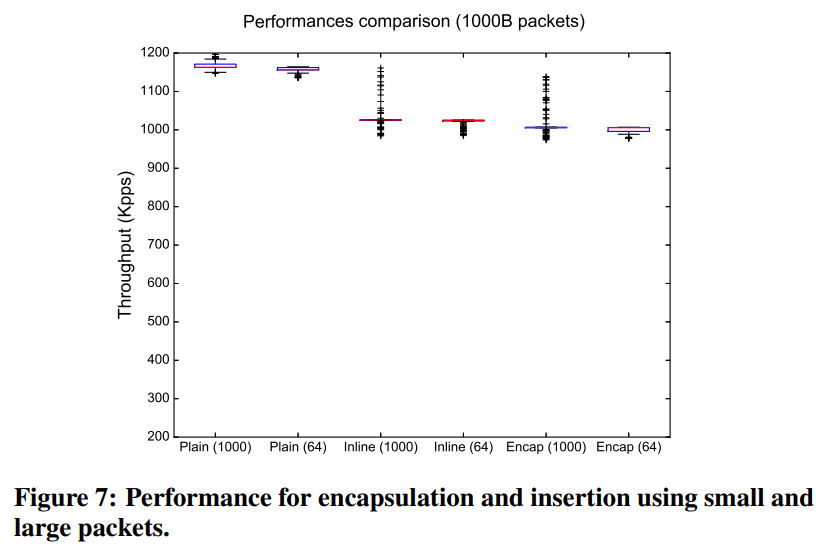
Source: Implementing IPv6 Segment Routing in the Linux Kernel
Operation Example
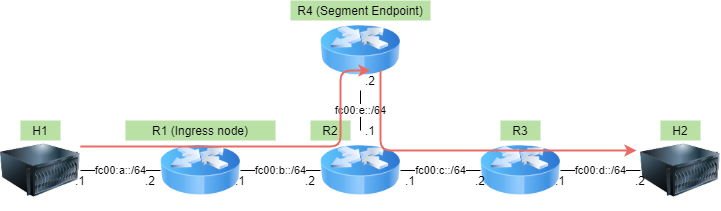
All Routers are responsible for L3 IPv6 forwarding. Static routes are added in advance. All Routers and Hosts are distinguished by namespaces. Assume R1 as the ingress node and add SRH to go through R4. Capture packets immediately after adding SRH on R1.
# create namespaces
for ns in h1 h2 r1 r2 r3 r4
do
  ip netns del $ns
  ip netns add $ns
  ip netns exec $ns sysctl net.ipv6.conf.all.forwarding=1
  ip netns exec $ns sysctl net.ipv6.conf.all.seg6_enabled=1
done

# setup veth pair
ip link add h1-r1 type veth peer name r1-h1
ip link add r1-r2 type veth peer name r2-r1
ip link add r2-r3 type veth peer name r3-r2
ip link add r3-h2 type veth peer name h2-r3
ip link add r2-r4 type veth peer name r4-r2

# assign veth to namespace
ip link set h1-r1 netns h1
ip link set r1-r2 netns r1
ip link set r2-r3 netns r2
ip link set r3-h2 netns r3
ip link set r2-r4 netns r2

ip link set r1-h1 netns r1
ip link set r2-r1 netns r2
ip link set r3-r2 netns r3
ip link set h2-r3 netns h2
ip link set r4-r2 netns r4

# link up
ip netns exec h1 ip link set h1-r1 up
ip netns exec r1 ip link set r1-r2 up
ip netns exec r2 ip link set r2-r3 up
ip netns exec r3 ip link set r3-h2 up
ip netns exec r2 ip link set r2-r4 up

ip netns exec r1 ip link set r1-h1 up
ip netns exec r2 ip link set r2-r1 up
ip netns exec r3 ip link set r3-r2 up
ip netns exec h2 ip link set h2-r3 up
ip netns exec r4 ip link set r4-r2 up

# assign ipv6 addr
ip netns exec h1 ip addr add fc00:a::1/64 dev h1-r1
ip netns exec r1 ip addr add fc00:b::1/64 dev r1-r2
ip netns exec r2 ip addr add fc00:c::1/64 dev r2-r3
ip netns exec r3 ip addr add fc00:d::1/64 dev r3-h2
ip netns exec r2 ip addr add fc00:e::1/64 dev r2-r4

ip netns exec r1 ip addr add fc00:a::2/64 dev r1-h1
ip netns exec r2 ip addr add fc00:b::2/64 dev r2-r1
ip netns exec r3 ip addr add fc00:c::2/64 dev r3-r2
ip netns exec h2 ip addr add fc00:d::2/64 dev h2-r3
ip netns exec r4 ip addr add fc00:e::2/64 dev r4-r2

# add route
ip netns exec h1 ip -6 route add fc00:d::/64 via fc00:a::2
ip netns exec h1 ip -6 route add fc00:e::/64 via fc00:a::2
ip netns exec r1 ip -6 route add fc00:d::/64 via fc00:b::2
ip netns exec r1 ip -6 route add fc00:e::/64 via fc00:b::2
ip netns exec r2 ip -6 route add fc00:d::/64 via fc00:c::2
ip netns exec r4 ip -6 route add fc00:d::/64 via fc00:e::1

ip netns exec h2 ip -6 route add fc00:a::/64 via fc00:d::1
ip netns exec r4 ip -6 route add fc00:a::/64 via fc00:e::1
ip netns exec r3 ip -6 route add fc00:a::/64 via fc00:c::1
ip netns exec r2 ip -6 route add fc00:a::/64 via fc00:b::1

# start tcpdump
rm -rf /tmp/srv6-demo.pcap
timeout 20 ip netns exec r2 tcpdump -i r2-r1 ip6 -w /tmp/srv6-demo.pcap &

# ping with default path from h1 to h2
sleep 3
ip netns exec h1 ping -6 -c 1 fc00:d::2

# enable seg6
ip netns exec r4 sysctl net.ipv6.conf.r4-r2.seg6_enabled=1
ip netns exec r2 sysctl net.ipv6.conf.r2-r4.seg6_enabled=1
ip netns exec r3 sysctl net.ipv6.conf.r3-r2.seg6_enabled=1
ip netns exec h2 sysctl net.ipv6.conf.h2-r3.seg6_enabled=1

for mode in encap inline
do
  # add seg6 route
  ip netns exec r1 ip -6 route del fc00:d::/64
  ip netns exec r1 ip -6 route add fc00:d::/64 encap seg6 mode $mode \
    segs fc00:e::2 dev r1-r2
  ip netns exec r1 ip -6 route show

  # ping with SRv6 path from h1 to h2
  sleep 3
  ip netns exec h1 ping -6 -c 1 fc00:d::2
done

for job in `jobs -p`
do
  wait $job
done
Let’s look at the captured content.
$ tshark -r /tmp/srv6-demo.pcap | grep "(ping) request"

# Plain ping6
   17   2.941160    fc00:a::1 → fc00:d::2    ICMPv6 118 Echo (ping) request id=0x1839, seq=1, hop limit=63
# SRv6 Encap ping6
   21   5.962394    fc00:a::1 → fc00:d::2    ICMPv6 182 Echo (ping) request id=0x1847, seq=1, hop limit=64
# SRv6 Inline ping6
   27   8.974298    fc00:a::1 → fc00:d::2    ICMPv6 158 Echo (ping) request id=0x184c, seq=1, hop limit=63

$ tshark -r /tmp/srv6-demo.pcap -Y "frame.number == 17 or frame.number == 21 or frame.number == 27" -V

# Plain ping6
# Baseline. Sent directly from H1 fc00:a::1 to H2 fc00:d::2
Frame 17: 118 bytes on wire (944 bits), 118 bytes captured (944 bits)
Ethernet II, Src: 2a:46:70:ec:24:c3 (2a:46:70:ec:24:c3), Dst: 32:b7:05:4c:f8:81 (32:b7:05:4c:f8:81)
Internet Protocol Version 6, Src: fc00:a::1, Dst: fc00:d::2
    Source: fc00:a::1
    Destination: fc00:d::2
Internet Control Message Protocol v6

# SRv6 Encap ping6
Frame 21: 182 bytes on wire (1456 bits), 182 bytes captured (1456 bits)
Ethernet II, Src: 2a:46:70:ec:24:c3 (2a:46:70:ec:24:c3), Dst: 32:b7:05:4c:f8:81 (32:b7:05:4c:f8:81)
Internet Protocol Version 6, Src: fc00:b::1, Dst: fc00:e::2 # outer IPv6 header
    Source: fc00:b::1
    Destination: fc00:e::2
    Routing Header for IPv6 (Segment Routing)
        Next Header: IPv6 (41)
        Length: 2
        [Length: 24 bytes]
        Type: Segment Routing (4)
        Segments Left: 0
        First segment: 0
        Flags: 0x00
            0... .... = Unused: 0x0
            .0.. .... = Protected: False
            ..0. .... = OAM: False
            ...0 .... = Alert: Not Present
            .... 0... = HMAC: Not Present
            .... .000 = Unused: 0x0
            [Expert Info (Note/Undecoded): Dissection for SRH TLVs not yet implemented]
                [Dissection for SRH TLVs not yet implemented]
                [Severity level: Note]
                [Group: Undecoded]
        Reserved: 0000
        Address[0]: fc00:e::2
        [Segments in Traversal Order]
            Address[0]: fc00:e::2
Internet Protocol Version 6, Src: fc00:a::1, Dst: fc00:d::2 # inner IPv6 header, src/dst unchanged
    Source: fc00:a::1
    Destination: fc00:d::2
Internet Control Message Protocol v6

# SRv6 Inline ping6
Frame 27: 158 bytes on wire (1264 bits), 158 bytes captured (1264 bits)
Ethernet II, Src: 2a:46:70:ec:24:c3 (2a:46:70:ec:24:c3), Dst: 32:b7:05:4c:f8:81 (32:b7:05:4c:f8:81)
Internet Protocol Version 6, Src: fc00:a::1, Dst: fc00:e::2
    Source: fc00:a::1
    Destination: fc00:e::2
    Routing Header for IPv6 (Segment Routing)
        Next Header: ICMPv6 (58)
        Length: 4
        [Length: 40 bytes]
        Type: Segment Routing (4)
        Segments Left: 1
        First segment: 1
        Flags: 0x00
            0... .... = Unused: 0x0
            .0.. .... = Protected: False
            ..0. .... = OAM: False
            ...0 .... = Alert: Not Present
            .... 0... = HMAC: Not Present
            .... .000 = Unused: 0x0
            [Expert Info (Note/Undecoded): Dissection for SRH TLVs not yet implemented]
                [Dissection for SRH TLVs not yet implemented]
                [Severity level: Note]
                [Group: Undecoded]
        Reserved: 0000
        Address[0]: fc00:d::2 [next segment] # Final destination is included in SRH
        Address[1]: fc00:e::2
        [Segments in Traversal Order]
            Address[1]: fc00:e::2
            Address[0]: fc00:d::2 [next segment]
Internet Control Message Protocol v6
Summary
I was able to confirm the operation with a simple configuration. I’d like to try using functions like End.DX4 as well.
I want to know the Pros/Cons of encap and inline.