qcow2 Structure
Before discussing subclusters, let me briefly explain the data structure of qcow2. qcow2 data is composed of small blocks called clusters. When a guest reads or writes to a virtual disk, I/O is performed in cluster units on the backend qcow2 file. For example, in an environment where the cluster size is 64KB (QEMU’s default), if the guest reads or writes in 4KB units (a major block size), the I/O to the qcow2 file will be in 64KB units.
Since qcow2 files are sparse, the actual disk size is smaller than the size seen by the guest. In this situation, the offset within the virtual disk as seen from the guest and the offset from the qcow2 file on the host are fundamentally different. Therefore, offset conversion between the virtual disk and the qcow2 file is necessary. In qcow2, offset conversion is realized using two-level conversion tables (L1 table and L2 table). Let’s look at each table.
There is only one L1 table in a qcow2 file. This table is sufficiently small, for example, even for a 1TB qcow2 file it fits in about 16KB. Therefore, QEMU always keeps this in RAM as a cache 1. The entries in this table are 64-bit pointers pointing to L2 tables.
L2 tables are dynamically generated as writes to the qcow2 file progress, and multiple L2 tables exist in one qcow2 file. The entry size is 64 bits, storing pointers to data clusters that store actual data in the qcow2 file.
L2 tables can be huge depending on the virtual disk size, so it’s difficult to load them all into RAM. Therefore, when I/O is issued from a guest to a virtual disk in older QEMU, extra I/O is issued to the actual disk to reference the L2 table. This led to the idea of loading only some L2 table entries into RAM. This idea is called L2 cache, and its size is called the L2 cache size. If the L2 cache can be made large enough to cover the entire L2 table, the L2 table is completely in RAM, so extra I/O can be prevented. So how should we determine such an L2 cache size?
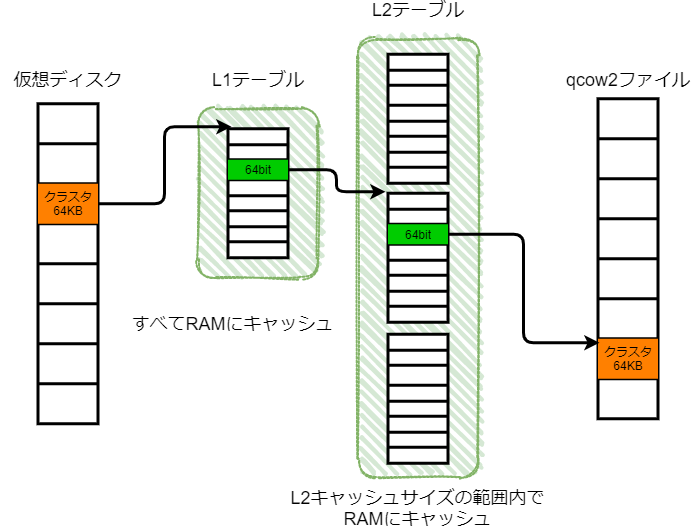
Here we return to the cluster size topic mentioned at the beginning. The number of clusters can simply be calculated as disk size / cluster size. Since L2 table entries are 64 bits, the total size of the L2 table is (disk size / cluster size) x 64 bits. In other words, the L2 cache size (to completely load the L2 table into RAM) can also be calculated by this formula.
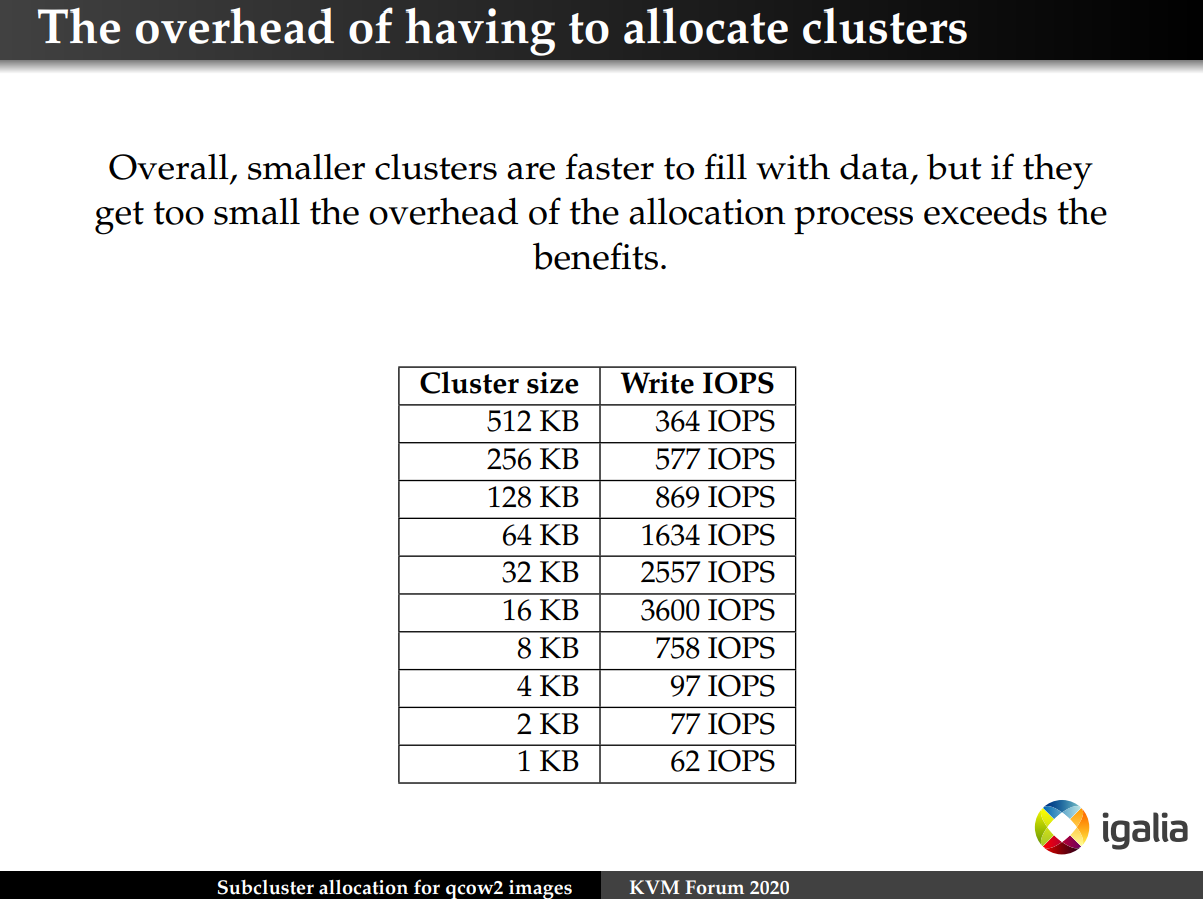
Let’s look in detail at the relationship between cluster size and L2 cache size. If you make the cluster size smaller, I/O to the qcow2 file is performed in fine units, preventing extra I/O, but you need to make the L2 cache size larger, increasing RAM usage. Also, as the number of clusters increases, the ratio of metadata to data size becomes larger, so you can’t make it arbitrarily small. On the other hand, if you make the cluster size larger, you can make the L2 cache size smaller, reducing RAM usage, but extra I/O occurs.
Libvirt Support Status
We’ve found that the L2 cache size has a significant impact on qcow2 file I/O. Of course, this can be provided externally as a parameter when starting a guest in QEMU2, but what about Libvirt?
Actually, as of March 2021, you cannot manipulate this parameter from Libvirt yet. A Feature Request 3 has existed since 2016, and several patches 4 5 have been submitted, but it hasn’t been merged yet. Why is that? Let me read the comments in the Feature Request.
After skimming through, I got the impression that Libvirt doesn’t want to accept a method of describing the L2 cache size in absolute values. As suggested in the comments, if it could be represented in percentages instead of absolute values, it would certainly be more user-friendly. Of course, there are many opinions wanting to use this parameter quickly.
Time moved on and in QEMU 3.1 the L2 cache size became 32MB by default, so in environments with the default cluster size (64KB), the entire L2 table of a 256GB qcow2 file can be loaded into RAM without doing anything. Furthermore, in QEMU 5.2, a new implementation called subcluster was added, reducing the L2 table size to 1/16. In other words, it can cover 256GB x 16 = 4TB qcow2 files. Since most use cases have virtual disk sizes under 4TB, I think the default settings will work properly enough.
Where did subcluster and the number 1/16 come from? Let me investigate further.
Subcluster Introduction
How to handle qcow2 file cluster size and L2 cache size has been discussed over several years. As one improvement, QEMU 5.2 introduced subcluster, an extension of qcow2’s L2 table entries 6. The base idea is to divide one cluster into 32 subclusters.
To reiterate, previously L2 table entries simply stored pointers to data clusters. With subcluster introduction, by having a bitmap holding the state of 32 subclusters immediately after the existing L2 table entry, I/O can be performed at 1/32 granularity. This bitmap fits in 64 bits (the same as the L2 table entry size), so the number of L2 table entries doubles. When I/O granularity is the same as the existing implementation, the number of L2 table entries dramatically decreases to 2 x 1/32 = 1/16. In other words, the L2 cache size (to completely load the L2 table into RAM) can be reduced to 1/16.
Looking at performance improvements, performance significantly improved in situations where new cluster allocation occurs, such as when using backing files.
Created a 40GB file with a backing file and performed 4KB Rand Write
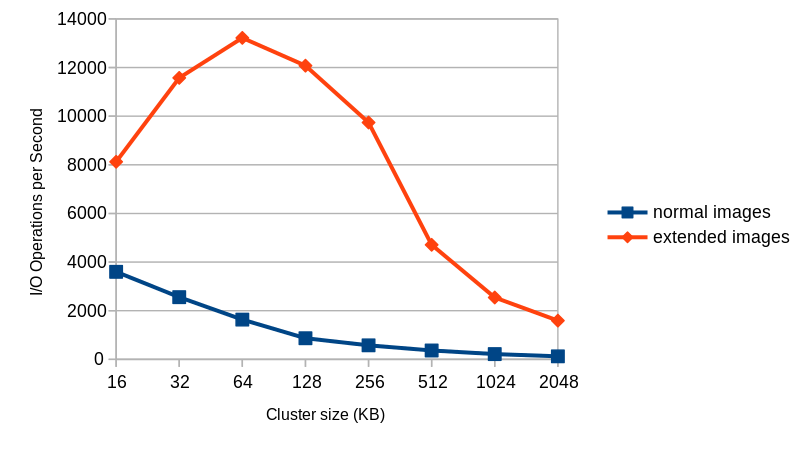
To use subclusters, simply set extended_l2=on as an argument to the qemu-img command. Since major file systems often have a block size of 4KB, setting the cluster size to 4KB x 32 subclusters = 128KB eliminates unnecessary Copy-on-Write regions and works well. However, there’s no compatibility with older QEMU, and qcow2 files created with QEMU 5.2 or later cannot be handled by versions before QEMU 5.2, so be careful.
$ qemu-img create -f qcow2 -o extended_l2=on,cluster_size=128k img.qcow2 1T
Relationship between Cluster Size, L2 Cache Size and Virtual Disk Size
The default values in QEMU 5.2 are 64KB for cluster size and 32MB for L2 cache size, so in situations where subcluster is enabled (extended_l2=on), up to 4TB qcow2 files should have the L2 table completely in RAM (needs verification). Conversely, when handling larger virtual disks, you need to consider the L2 cache size and cluster size each time.
(Virtual disk size) / (Cluster size) / (Reduction rate from subcluster introduction) x (L2 table entry size) <= L2 cache size
(Virtual disk size) / 64KB / 16 x 8Byte <= 32MB
(Virtual disk size) <= 32MB x 64KB x 16 / 8Byte
(Virtual disk size) <= 4TB
Summary
To summarize the lengthy discussion, from QEMU 5.2 onward, by setting extended_l2=on, for virtual disks of 4TB or less, I/O performance and overhead should be fine (needs verification). Since I don’t have a 4TB disk on hand and haven’t conducted benchmarks, I’ll add more once data is available.
-
https://github.com/qemu/qemu/blob/ff81439aafac58887b18032acd18a117f534cd75/docs/qcow2-cache.txt#L42-L43 ↩︎
-
https://github.com/qemu/qemu/blob/ff81439aafac58887b18032acd18a117f534cd75/docs/qcow2-cache.txt#L128-L132 ↩︎
-
Bug 1377735 - [Feature Request] Add ability to set qcow2 l2-cache-size ↩︎
-
[libvirt] [PATCH 0/2] Add ’l2-cache-size’ property to specify maximum size of the L2 table cache for qcow2 image ↩︎
-
Faster and Smaller qcow2 Files With Subcluster-based Allocation - Alberto Garcia, Igalia ↩︎