Recently, I heard that OVS (Open vSwitch) has added support for AF_XDP, so I investigated what background led to this and how to use it. OVS is composed of kernel modules and userspace processes. With this architecture, the following issues became apparent1, and recently the implementation using AF_XDP is being promoted as a replacement.
- Modifications that require kernel updates or system-wide restarts
- Influenced by kernel developer policies and implementations
- Performance lags behind DPDK
- Too many backports
- Sometimes loses distribution support
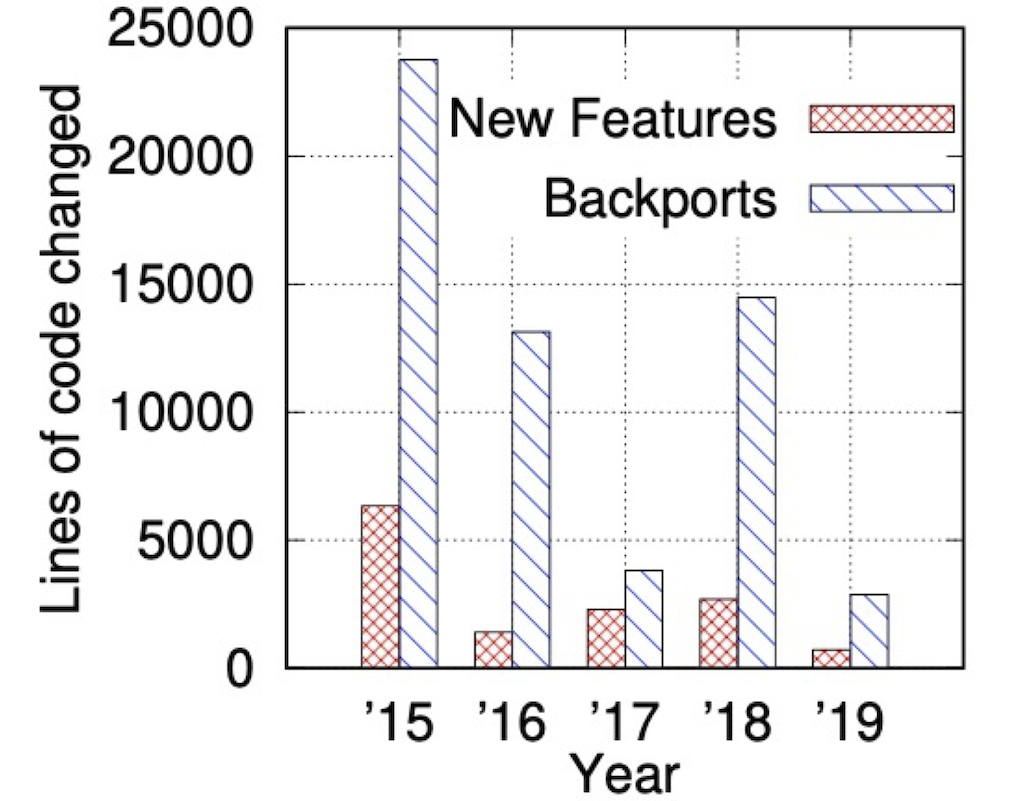
All of these seem to be valid reasons to push forward with architectural changes. The graph below compares the code changes in line count attributed to backports and new features respectively. You can see the cost of backporting. By the way, the implementation using kernel modules is scheduled to be deprecated2 in OVS 2.18, planned for release in April 2022.
Source: Revisiting the Open vSwitch Dataplane Ten Years Later
If you ask “why not just use DPDK (Data Plane Development Kit) which implements the dataplane in userspace?”, that has its own issues.
- Not compatible with kernel network stack tools like the ip command
- Occupies specific NICs and CPUs
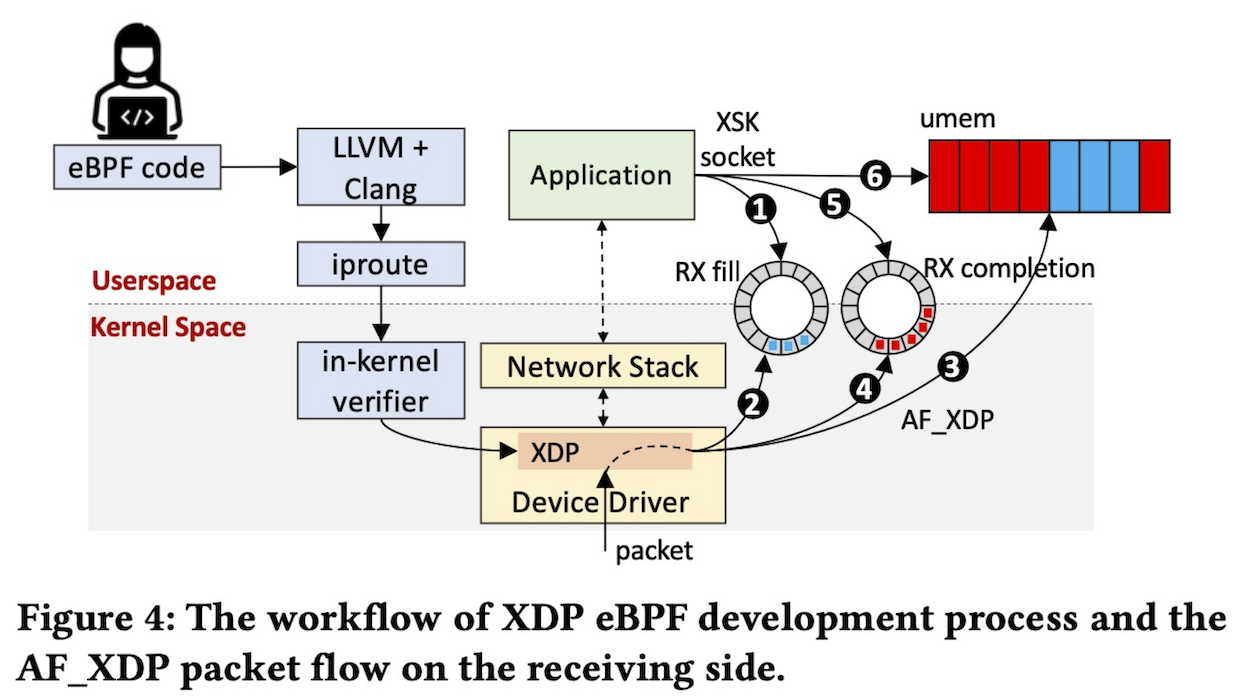
The introduction of AF_XDP is being promoted as an approach to solve these issues. With AF_XDP, you can set up a small eBPF program at the XDP hook point, bypass the kernel network stack, and forward packets to userspace processes. It has a stable specification, so it should continue to work in future kernel releases. It’s also compatible with existing tools. There’s also talk3 about using AF_XDP from DPDK, but maintenance costs between DPDK and OVS remain. So it seems they decided to support AF_XDP directly in OVS itself.
By the way, how are packets forwarded when using AF_XDP? AF_XDP has two rings: a fill ring and a completion ring. Each element is a descriptor pointing to the umem area. Let’s look at the flow during packet reception following the numbers in the diagram.
- First, the application registers an empty descriptor in the fill ring
- The kernel retrieves that descriptor from the fill ring
- It writes the packet body to the umem area
- It registers a descriptor pointing to that umem area in the completion ring
- The application retrieves the descriptor from the completion ring
- It retrieves the packet body from the umem area pointed to by that descriptor
Source: Revisiting the Open vSwitch Dataplane Ten Years Later
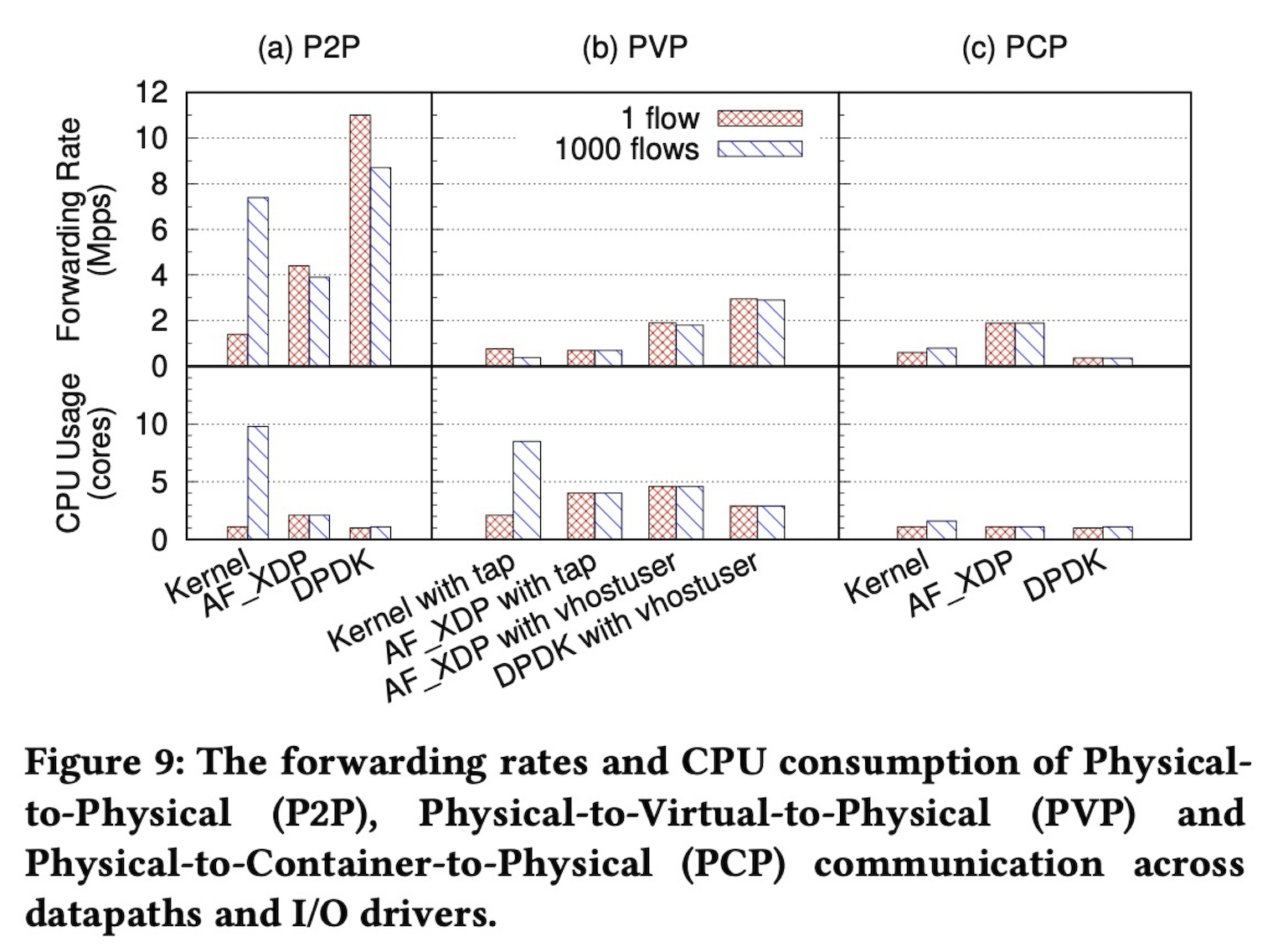
What about performance? There was data on throughput and CPU usage when sending 64-byte short packets on a 25G NIC. In PVP scenarios going through virtual machines, adopting vhostuser improves throughput while keeping CPU usage the same. However, it doesn’t reach DPDK. In PCP scenarios going through containers, AF_XDP seems to be the best choice since you can omit data copying between user and kernel space. There are pros and cons, so the choice will vary depending on the scenario.
Source: Revisiting the Open vSwitch Dataplane Ten Years Later
Now, let’s look at what commands to use for actual usage.
Note that the kernel needs to be built with CONFIG_BPF, CONFIG_BPF_SYSCALL, and CONFIG_XDP_SOCKETS enabled.
This time I decided to install the linux-image-5.11.0-41-generic package on Ubuntu 20.04.
Since it depends on libbpf, install it first.
git clone git://git.kernel.org/pub/scm/linux/kernel/git/bpf/bpf-next.git -b v5.15 --depth 1
pushd ./bpf-next/tools/lib/bpf
sudo make install
sudo sh -c "echo /usr/local/lib64 >> /etc/ld.so.conf"
sudo ldconfig
popd
When building ovs, specify --enable-afxdp.
git clone https://github.com/openvswitch/ovs.git -b v2.16.1 --depth 1
pushd ovs
./boot.sh
./configure --enable-afxdp
make -j $(nproc)
sudo make install
popd
Starting ovs is as usual.
When creating a bridge, specify datapath_type=netdev to use the userspace datapath.
These options are the same as when using DPDK.
sudo ovs-ctl start --system-id=random
sudo ovs-vsctl -- add-br br0 -- set Bridge br0 datapath_type=netdev
This time I want to create two netns and communicate between them.
sudo ip netns add at_ns0
sudo ip link add p0 type veth peer name afxdp-p0
sudo ip link set p0 netns at_ns0
sudo ip link set dev afxdp-p0 up

sudo ip netns add at_ns1
sudo ip link add p1 type veth peer name afxdp-p1
sudo ip link set p1 netns at_ns1
sudo ip link set dev afxdp-p1 up
When creating ports, add the type="afxdp" option.
sudo ovs-vsctl add-port br0 afxdp-p0 -- set interface afxdp-p0 type="afxdp"
sudo ovs-vsctl add-port br0 afxdp-p1 -- set interface afxdp-p1 type="afxdp"
Bring up the link and assign IP addresses in each netns.
sudo ip netns exec at_ns0 sh << NS_EXEC_HEREDOC
sudo ip addr add "10.1.1.1/24" dev p0
sudo ip link set dev p0 up
NS_EXEC_HEREDOC

sudo ip netns exec at_ns1 sh << NS_EXEC_HEREDOC
sudo ip addr add "10.1.1.2/24" dev p1
sudo ip link set dev p1 up
NS_EXEC_HEREDOC
Finally, when you inject a flow rule like actions=normal, communication becomes possible.
sudo ovs-ofctl add-flow br0 actions=normal
sudo ip netns exec at_ns0 ping -i .2 10.1.1.2
# PING 10.1.1.2 (10.1.1.2) 56(84) bytes of data.
# 64 bytes from 10.1.1.2: icmp_seq=1 ttl=64 time=0.128 ms
# 64 bytes from 10.1.1.2: icmp_seq=2 ttl=64 time=0.069 ms
# 64 bytes from 10.1.1.2: icmp_seq=3 ttl=64 time=0.066 ms
#
# --- 10.1.1.2 ping statistics ---
# 3 packets transmitted, 3 received, 0% packet loss, time 2028ms
# rtt min/avg/max/mdev = 0.066/0.087/0.128/0.028 ms
As stated in the official documentation4 “The AF_XDP support of Open vSwitch is considered ’experimental’, and it is not compiled in by default.”, it seems to be in an experimental position. Indeed, some features are not yet usable. That’s all for now.