
First, let me introduce TRex. TRex 1 is a software-implemented traffic generator that supports two modes: Stateful/Stateless. Stateless is a mode for generating packet sequences to a stateless target DUT (Device Under Test), and can be used as a performance measurement tool for switching and routing.
Although TRex has many features, personally I often need to generate simple TCP/IP packet sequences while changing their size, so I created autotrex 2 as a wrapper for TRex. autotrex is for automatically executing and aggregating benchmarks, and for example, can easily generate figures like the one below as output. Here I’ll briefly record how to use it.
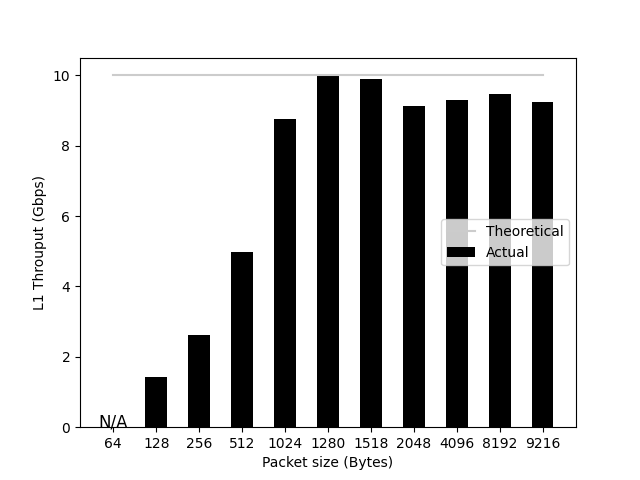
In autotrex, of the two ports described in trex_cfg.yaml (a configuration file commonly used in the TRex world),
the first port is responsible for transmission, and the second port is responsible for reception.
It counts the number of packets for transmission and reception respectively, and uses binary search to find the maximum packet rate
(Packets Per Second, PPS) where the error is below a certain threshold
(for example, 0.01%).
Of course, you can freely configure the packet sequence you want to generate as shown below.
The ones I often use are bundled in the autotrex repository 3 and
are easy to use.
# Excerpt from tcp_1pkt.py
pkt=Ether()/IP(src="16.0.0.1", dst="48.0.0.1") /
    TCP(dport=12, sport=1025)/(payload_size*'x')
By issuing the run.sh command with a Python file tcp_1pkt.py describing the packet sequence as an argument,
like ./run.sh tcp_1pkt.py, packet generation is automatically performed
while changing the size.
When a series of benchmark executions is complete, csv files and png files representing packet rate, L1/L2 throughput are output as results.
You can find out in advance what kind of packets will be generated with the ./simulate.sh tcp_1pkt.py command.
This might be convenient if you want to generate packets independently.
In environments where performance is needed, configure CPU information in trex_cfg.yaml as shown below.
Empirically, assigning unique CPUs to master_thread_id, latency_thread_id, and threads
yields higher performance. Details are explained in the documentation 4.
platform:
  master_thread_id: 0
  latency_thread_id: 5
  dual_if:
  - socket: 0
    threads: [1, 2, 3, 4]
That’s it for introducing a tool I personally use. The end.