I investigated how to explicitly specify thread and memory placement in a NUMA environment, so I’m leaving this as a note. In environments where multiple multi-core CPUs are installed in a single chassis, memory is connected to each CPU. In such environments, data can be transferred at high speed between directly connected memory (local memory) and the CPU via the bus. On the other hand, to transfer data to memory that is not directly connected (remote memory), it is necessary to go through other CPU sockets via interconnects such as QPI (QuickPath Interconnect). Environments where multiple memory access mechanisms exist like this are called NUMA (Non-Uniform Memory Access).
To tune multi-threaded programs in a NUMA environment, it becomes important to decide which core threads are assigned to and which memory data is placed in. These controls can be achieved using the numactl command or the libnuma library.
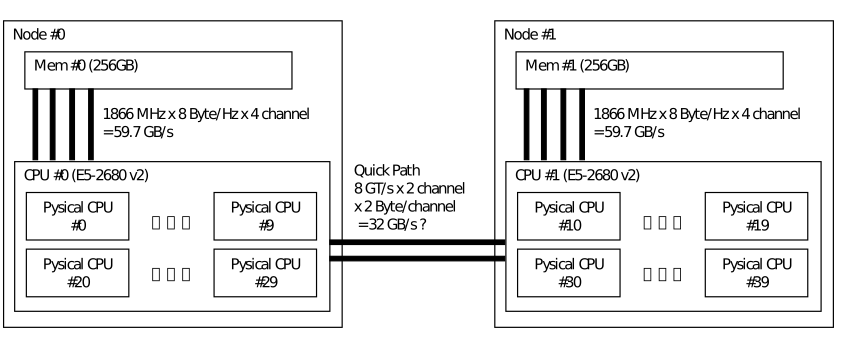
Control with numactl
In situations where you cannot modify the source code (or when it’s too troublesome),
use the numactl command to set affinity.
The --cpubind=<nodemask> option specifies which node the thread should run on,
and the --membind=<nodemask> option specifies which node’s memory data should be placed in.
For <nodemask>, write node numbers separated by commas like --membind=0,1.
There are also
the --preferred=<nodenumber> option to specify the preferred node for memory allocation
and the --interleave=<nodemask> option to allocate memory in an interleaved manner across multiple nodes.
Hardware information such as node numbers can be checked with the --hardware option.
To check the policy assigned to a process, use the --show option.
# Place threads on node 0, data on nodes 0 and 1
$ numactl --cpubind=0 --membind=0,1 ./a.out
# Place memory in an interleaved manner and check with numactl --show
$ numactl --interleave=all numactl --show
Control with libnuma
In situations where you can modify the source code, use libnuma.
While numactl controls memory allocation for the entire program,
libnuma controls individual memory regions separately.
To use libnuma, add the numa.h header to your code
and link the shared library (-lnuma).
The set of node numbers <nodemask> is stored in a nodemask_t type variable.
For memory allocation, use the appropriate numa_alloc_* family of functions
according to how you want to allocate memory.
For memory deallocation, commonly use the numa_free function.
Furthermore, using the numa_run_on_node or numa_run_on_node_mask function,
you can explicitly specify which node a thread should run on.
nodemask_t m;              // Variable m to store the set of node numbers
nodemask_zero(&m);         // Initialize m
nodemask_set(&m, 2);       // Enable node number 2
nodemask_clr(&m, 2);       // Disable node number 2
nodemask_all_nodes(&m);    // Enable all nodes
nodemask_no_nodes(&m);     // Empty set
nodemask_isset(&m, 2);     // True if node number 2 is set

size_t s = 4 * 1024;       // Data size 4KB

// Allocate on the 2nd node
void *mem1 = numa_alloc_onnode(s, 2);
// Allocate in an interleaved manner across all nodes
void *mem2 = numa_alloc_interleaaved(s);
// Allocate in an interleaved manner across nodes indicated by m
void *mem3 = numa_alloc_interleaaved_subset(s, m);
// Allocate in local memory
void *mem4 = numa_alloc_local(s);

// Free memory
numa_free(mem1,s); numa_free(mem2,s); numa_free(mem3,s); numa_free(mem4,s);

// Run the current thread on node 1
numa_run_on_node(1);

// Run the current thread on any node included in m
nodemask_zero(&m);
nodemask_set(&m,1);
nodemask_set(&m,2);
numa_run_on_node_mask(m);
Control with OpenMP
When implementing multi-threading using OpenMP, control affinity through environment variables.
The control method differs for each compiler, for example,
for the PGI compiler, set MP_BIND and MP_BLIST.