Miscellaneous Notes
- vSphere environment interfaces
- GUI: vSphere Client, vSphere Web Client
- CLI: vSphere CLI, VMware vSphere Power CLI
- DCUI (Direct Console User Interface): ESXi console
- Virtual disks are created as a single file called .vmdk and stored in the datastore.
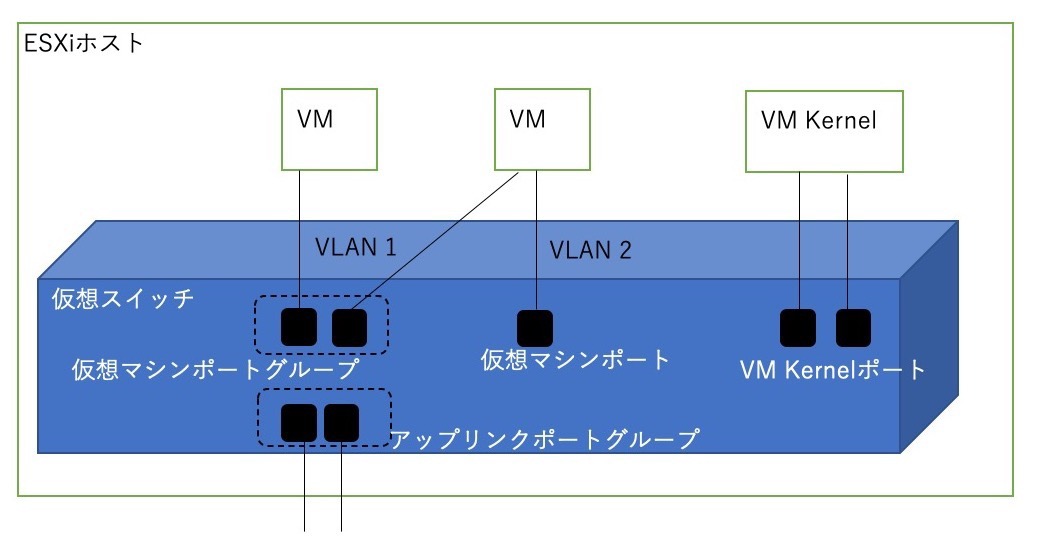
- For VLAN VST configuration, Port Group = VLAN configuration is common and recommended.
- vSphere DRS automatically performs vMotion for the purpose of load balancing between ESXi hosts.
- vMotion is so-called live migration.
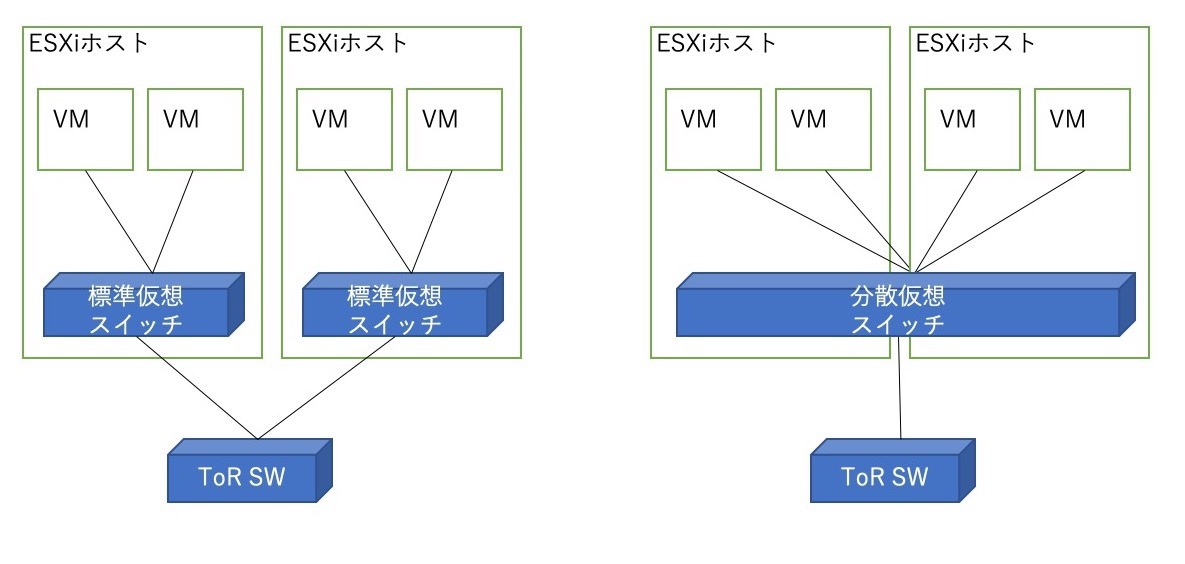
- Cross vSwitch vMotion: Between hosts with different virtual switches
- Cross vCenter vMotion: Between hosts with different vCenters
- Long Distance vMotion: Allows up to 150ms network latency
- When duplicating virtual machines using templates or clones, unique settings such as hostname, IP address, and license information can be handled as “customization specifications”
- From vSphere 5.5 onwards, pktcap-uw CLI has been added to perform packet capture and trace on ESXi hosts. It can capture packets from physical NICs, virtual ports, virtual switches, and distributed virtual switches
Files that Compose a Virtual Machine
- VMX file: Detailed configuration information and hardware information
- VSWP file: Swap-out destination for virtual machines
- VMDK file (-flat.VMDK file): Virtual disk contents are stored
- VMSD file: Snapshots and metadata
- When an ESXi host under vCenter is set to lockdown mode, direct login becomes unavailable
- ESXi hosts are placed within the data center
VMDK Storage
- VMFS: A cluster file system accessible from multiple ESXi hosts, created on FC or iSCSI
- Lazy Zeroed (Thick Provisioning): Reserves space when creating VMDK. No zero initialization.
- Eager Zeroed (Thick Provisioning): Reserves space when creating VMDK. With zero initialization.
- Thin Provisioning: Expands space when needed.
- NFS
- Thin Provisioning: Managed by the NFS server side.
VLAN Handling
- EST (External Switch Tagging)
- Treats physical NICs of ESXi hosts as port VLANs (access ports)
- Standard Virtual Switch (VLAN ID specification): 0 or blank
- Distributed Virtual Switch (VLAN type specification): None
- VST (Virtual Switch Tagging)
- Configure tagged VLAN on physical switch, assign VLAN to virtual switch port groups
- Standard Virtual Switch: 1~4094
- Distributed Virtual Switch: Select VLAN and enter ID
- VGT (Virtual Guest Tagging)
- Configure tagged VLAN on physical switch, forward frames to virtual machines with VLAN tags intact
- Standard Virtual Switch: 4095 or ALL
- Distributed Virtual Switch: Select VLAN trunk and enter range